Source: https://datafa.st/docs/custom-goals
Markdown source: https://datafa.st/docs/custom-goals.md
Description: Learn how to track specific user actions like signups or newsletter subscriptions using client-side scripts or server-side API calls.
# Track custom user actions (Goals)
DataFast allows you to track specific user actions beyond pageviews, known as Goal (signup, newsletter subscribe, checkout initiated, etc.).
- This helps you understand what visitors do
- Unlock the [Journey](/changelog/goal-tracking) feature
- Improve the [revenue predictions](/changelog/revenue-prediction) and [conversion funnels](/docs/conversion-funnels)
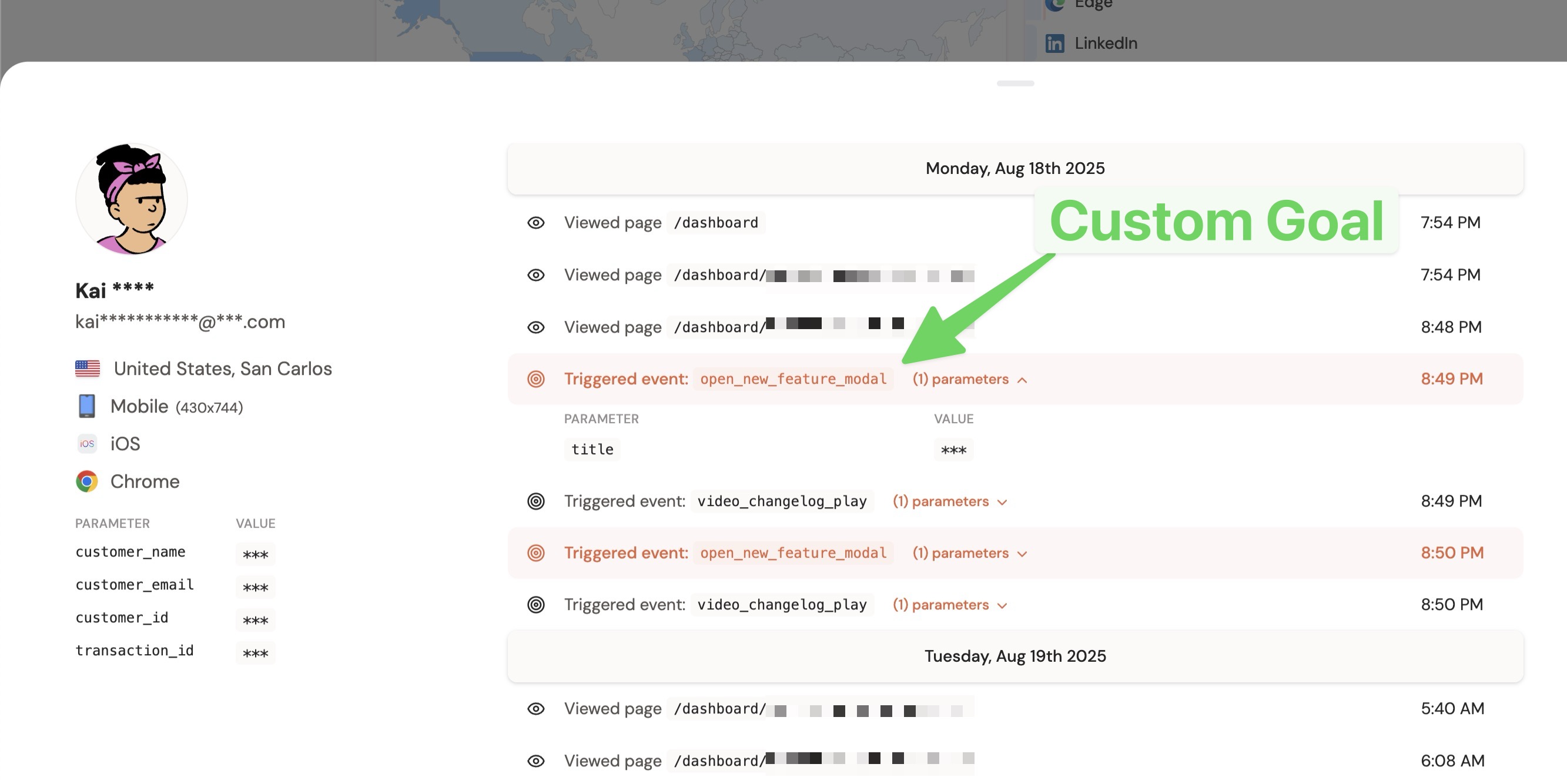
You can track goals using three methods:
## Method #1: Client-side tracking with JavaScript
Just call the `datafast()` function and pass the name of your goal `goal_name`.
Add the JavaScript snippet where the conversion occurs (e.g., on a "thank you" page after signup, when a user clicks a button, etc.).
```javascript
window?.datafast("signup");
```
**Rules for `goal_name`:**
- Use lowercase letters.
- Numbers, underscores (_), hyphens (-), and colons (:) are allowed.
- Maximum 64 characters.
### Advanced usage with custom parameters
Add an object with custom parameters to your goals for richer analytics in [Journey](/changelog/goal-tracking):
```javascript
window?.datafast("initiate_checkout", {
name: "Elon Musk",
email: "elon@x.com",
product_id: "prod_123",
});
```
**Rules for custom parameters:**
- **Property names:** lowercase letters, numbers, underscores (_), and hyphens (-) only. Max 64 characters.
- **Property values:** any string, max 255 characters.
- **Limits:** maximum 10 custom parameters per event.
### Ensure reliable tracking (recommended)
Add this script to your HTML `` to guarantee events are captured even when triggered before the main script loads:
```html
```
## Method #2: Client-side tracking with HTML data attributes
Track goals automatically when users click on any element with the `data-fast-goal` attribute. This is the simplest way to track button clicks.
```html
```
In this example DataFast will send a goal with the name `initiate_checkout`.
### Advanced usage with custom parameters
Add additional `data-fast-goal-*` attributes to include custom parameters:
```html
```
In this example DataFast will send a goal with the name `initiate_checkout` and `{ price: '49', currency: 'USD' plan_type: 'pro' }` custom parameters.
**Rules for data attribute values:**
- Goal names: same as JavaScript method (lowercase letters, numbers, underscores (_), hyphens (-), and colons (:) only, max 64 characters)
- Parameter names: extracted from attribute name and converted from kebab-case to snake_case (e.g., `data-fast-goal-product-id` → `product_id`)
- Parameter values: any string, max 255 characters (automatically sanitized)
- Maximum 10 custom parameters per event (same as JavaScript method)
> See the [script configuration reference](/docs/script-configuration) for complete details on all data attributes.
### Ensure reliable tracking (recommended)
Add this script to your HTML `` to guarantee events are captured even when triggered before the main script loads:
```html
```
> While easy to implement, client-side tracking might be less accurate due to ad blockers or network issues. For better reliability, use server-side tracking.
## Method #3: Server-side tracking (most accurate)
Track goals by sending data directly from your server using the [DataFast API](/docs/api-introduction). This is the recommended method for accuracy.
1. **Get an API Key:** Go to your **[Website Settings](/dashboard) > API** tab and create an API key to authenticate your requests.
2. **Send Goal data:** Use the [Goal API endpoint](/docs/api-create-goal) to send goal information from your backend whenever a user completes the desired action.
See the [API documentation for creating goals](/docs/api-create-goal) for detailed implementation examples.
> To track revenue specifically (e.g., completed purchases), use the dedicated [revenue attribution](/docs/revenue-attribution-guide) setup instead of custom goals for payments. This provides more detailed financial analytics thanks to Stripe, LemonSqueezy, or Polar integration.
---
## Viewing custom parameters in your dashboard
When you pass custom parameters to a goal (using any of the methods above), you can see them directly in your dashboard.
1. Go to your analytics dashboard
2. Hover on any goal in the **Goals** card
3. Click the **parameters icon** to expand the breakdown
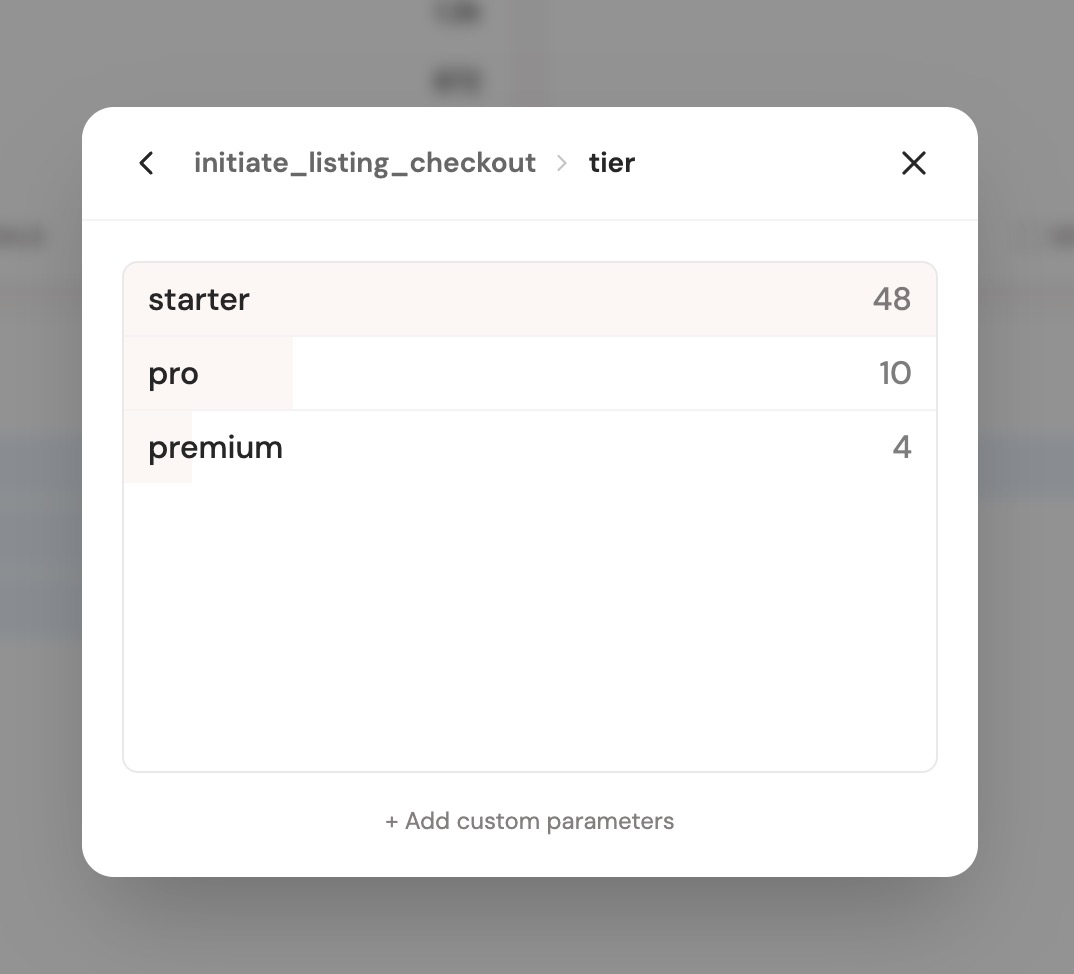
You'll see a breakdown of each parameter value and how many visitors matched it. For example, if you track an `initiate_checkout` goal with a `plan` parameter, you'll see how many visitors checked out on each plan (starter, pro, premium, etc.).
This works with any custom parameter you pass — user emails, product names, plan types, currencies, or anything else you track.
---
### Billing
Custom goals count towards your DataFast [monthly usage](/#pricing). Make sure to track only what you need. You can view your usage in your [DataFast billing](/dashboard/billing).
---
## Automatic payment-provider goals
When you [connect a payment provider](/docs/connect-payment-provider), DataFast automatically tracks reserved goals for revenue and subscription lifecycle events. These goals appear in the dashboard and can be used in [filters](/docs/datafast-filters), funnels, and the [CLI visitor search](/docs/cli-visitors).
> These names are reserved. Do not send custom goals with the same names, or your custom events may be confused with payment-provider events.
### Automatically tracked goal names
Generic payment events:
| Goal name | Meaning |
|---|---|
| `payment` | A payment was completed. |
| `free_trial` | A free trial was started or detected. |
Subscription lifecycle events:
| Goal name | Meaning |
|---|---|
| `trial_started` | A subscription trial started. |
| `trial_converted` | A trial converted to a paid subscription. |
| `subscription_started` | A paid subscription started. |
| `subscription_upgraded` | Subscription MRR increased. |
| `subscription_downgraded` | Subscription MRR decreased. |
| `subscription_renewed` | A subscription renewed. |
| `subscription_cancel_scheduled` | A cancellation was scheduled for the end of the billing period. |
| `subscription_reactivated` | A subscription was reactivated. |
| `subscription_ended` | A subscription ended. This is the goal to use for churned customers. |
For example, to find visitors who churned today with the CLI:
```sh
datafast visitors list --completed-goal subscription_ended --period today
datafast visitors get
```
See [Revenue attribution](/docs/revenue-attribution-guide) and [Connect payment providers](/docs/connect-payment-provider) for more context.