
Get started with the DataFast API
Use the DataFast API to read analytics, send server-side events, and manage your DataFast account from your own backend, scripts, or AI agents.
There are two API surfaces:
| Surface | Token | Use it for |
|---|---|---|
| Website API | df_ website API key | Read analytics, list visitors, send goals, send payments, identify users, or query one website |
| Account API | dft_ account token | Manage websites, create API keys, create funnels, manage alerts, invite team members, connect integrations, or let an AI agent manage your account |
| CLI | dft_ or df_ | Run the same workflows from a terminal with datafast |
Which one should I use?
- I want to read analytics for one website: use a
df_key and the analytics endpoints, visitor endpoints, or the API playground. - I want to send events from my backend: use a
df_key with goals, payments, or identify users. - I want an AI agent or script to manage my account: use a
dft_token with the Account API or the DataFast CLI. - I want to manage one website without full account access: create a scoped
dft_token with a website allowlist, or use adf_key for supported website-scoped admin routes. Read authentication and scopes before giving a token to an agent.
Base URL
The base URL for all v1 endpoints is:
https://datafa.st/api/v1/Authenticate requests
All API requests use a Bearer token:
Authorization: Bearer YOUR_TOKEN
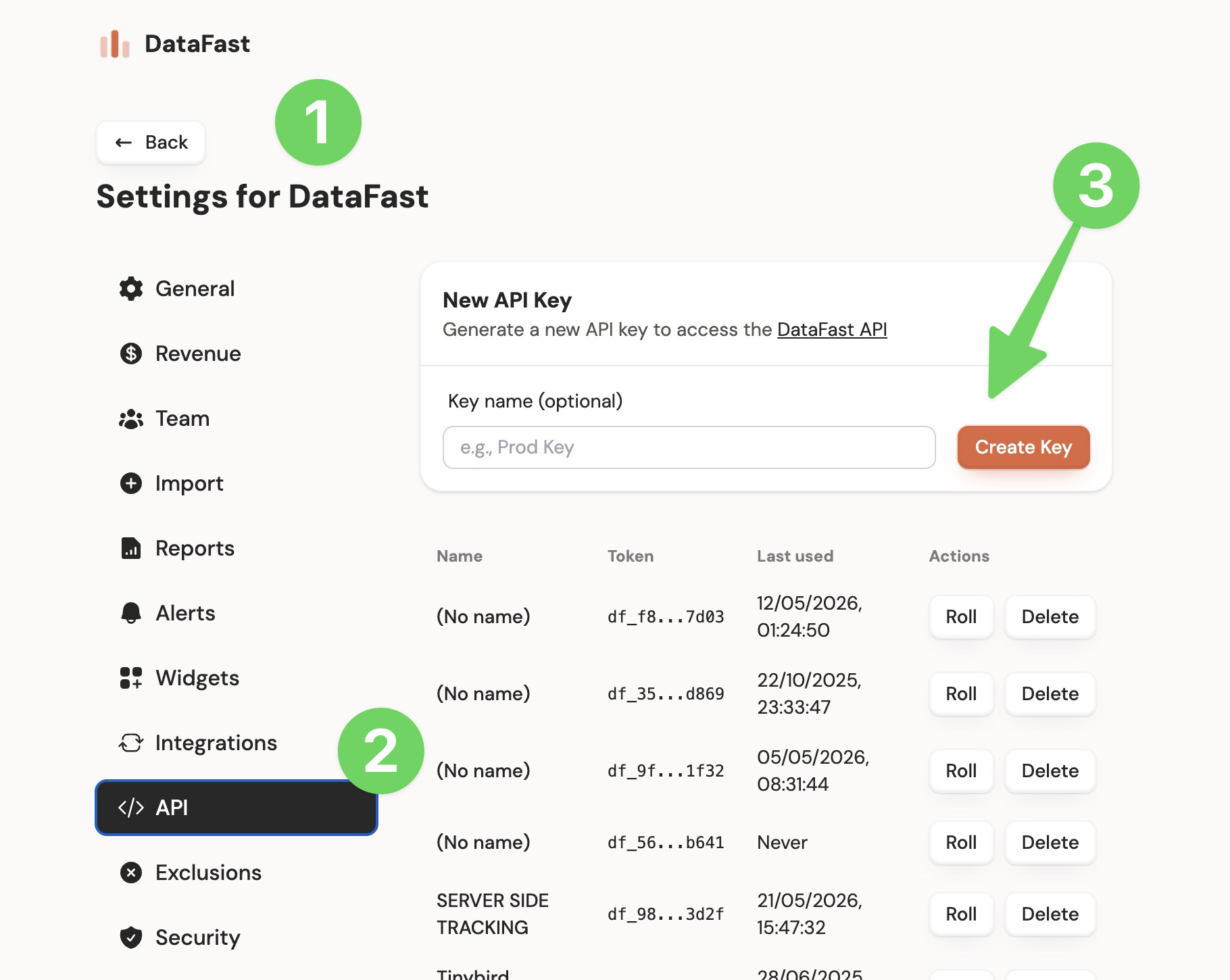
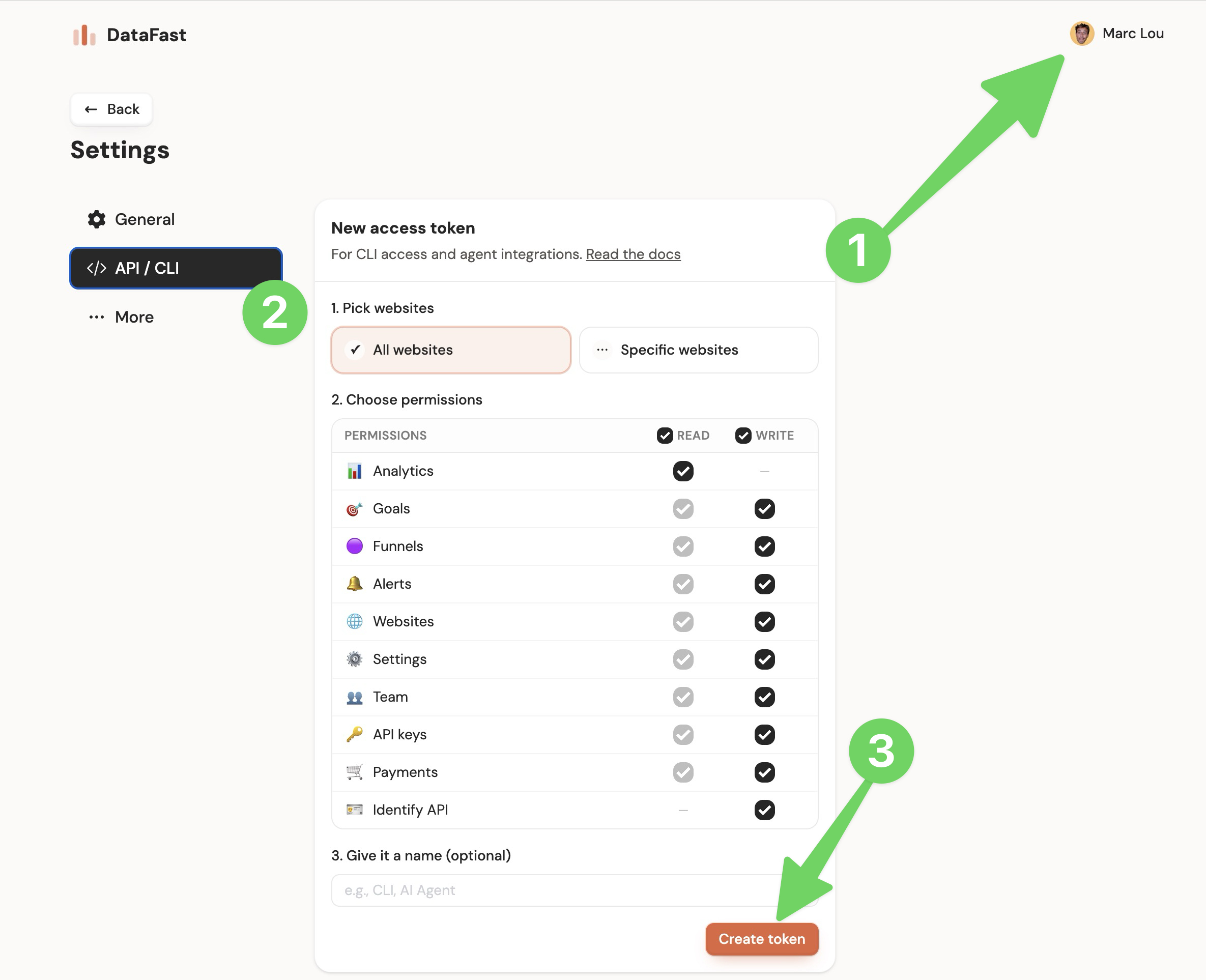
Create website API keys in Website settings -> API. Create account tokens in Account settings -> API, or with
datafast tokens create.Keep both token types secret. Do not expose them in frontend code or public repositories.
Get API keys from the dashboard
How to get a DataFast website API key (df_)
Create a website API key from Website settings -> Developer. If you are signed in, use the website selector in this docs header to switch the link to another website.
How to get a DataFast account API token (dft_)
Create an account API token from Account settings -> API. Use account tokens for CLI sessions, AI agents, and account automation.
Common use cases
- Get analytics data
- Query and manage Bot traffic
- List visitors
- Get funnel analytics
- Create a custom goal
- Identify a user from your backend
- Manage websites, funnels, alerts, and tokens
- Use the CLI
- Apps built on the API
Try the API playground to test website and account API endpoints interactively.
Successful requests return a
200 OK status and a body like:{
"status": "success",
"data": { ... } // Endpoint-specific data
}
Errors
Most failed requests return an appropriate HTTP status code and a JSON error body:
{
  "status": "error",
  "error": {
    "code": HTTP_STATUS_CODE,
    "message": "A descriptive error message"
  }
}
Common error codes:
| Code | Meaning | Common causes |
|---|---|---|
400 | Bad request | Missing required fields, invalid JSON body, invalid query parameter, invalid date range, invalid ObjectId, invalid enum value |
401 | Unauthorized | Missing Authorization header, invalid token, wrong token prefix, expired or revoked key |
403 | Forbidden | Token does not have the required permission, account does not have API access, token cannot access the requested website, role does not allow the write action |
404 | Not found | Website, visitor, funnel, alert, API key, token, or other resource does not exist or is not accessible to the token |
409 | Conflict | Resource already exists, such as a duplicate website, pending invite, or duplicate funnel name |
429 | Rate limited | Too many requests for the same token. Check the X-RateLimit-* response headers |
500 | Server error | Unexpected server-side error |
504 | Timeout | A long-running delete operation timed out. Retry with a smaller time range |
Some endpoints can return endpoint-specific errors. For example, website deletion is dashboard-only and returns
403, and POST /api/v1/payments returns a plain { "error": "..." } body for validation errors.Rate-limited responses include:
{
  "error": "Too many requests",
  "message": "Rate limit exceeded...",
  "limit": 60,
  "remaining": 0,
  "reset": 1716249600
}